
Grade faster and more consistently, and give students feedback they can follow
Gradescope is a grading tool for paper exams, homework, bubble sheets, and code, available to every Syracuse University instructor and opened right from your Blackboard course. You and your TAs grade one question at a time with a shared rubric, and students get clear feedback they can act on. The more students and graders you have, the more it helps.
Syracuse instructors on Gradescope
“Love grading by question and the ability to apply a consistent rubric easily. … Saves me a TON of time and I now can get grading done same day or next day instead of days/weeks.”
Instructor, Communication Sciences and Disorders, College of Arts and Sciences
“Ease of use, I can scan the bubble sheets in and get the results scored within 30 minutes for a 200+ person course.”
Instructor, Chemistry, College of Arts and Sciences
“The grading by problem, editable rubrics that will retroactively regrade. Sometimes I change my mind about a point allocation after seeing how students made errors.”
Instructor, College of Engineering and Computer Science
What is Gradescope?
Here is what grading one question looks like. The student’s handwritten exam was scanned into Gradescope, and the grader is working from a shared rubric on the right.
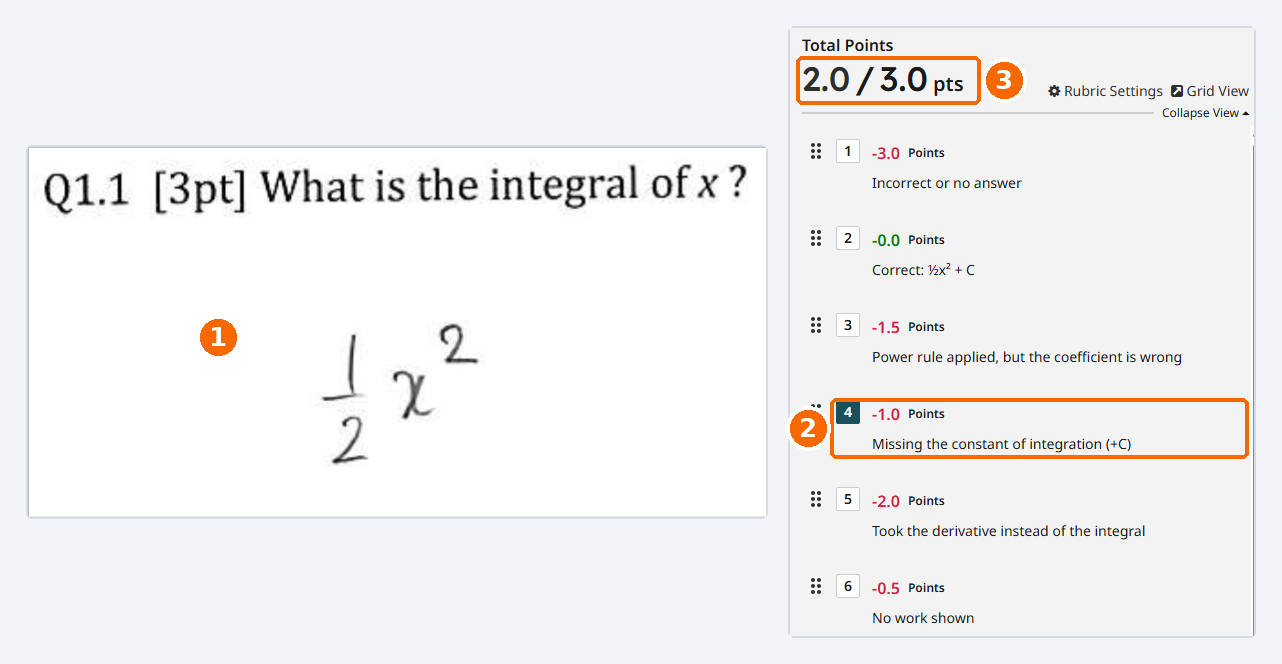
- The student’s work, scanned. Students write on paper as usual, or upload from a phone. You see every answer to this question, one after another.
- One click to grade. This student left off the +C, so the grader clicks that rubric item. The comment and the point deduction go to the student together.
- The score adds itself up. Change a rubric item’s points later, and every answer already graded with it updates, so the first and last papers are graded the same way.
Is Gradescope a good fit for my course?
It helps most when you have many submissions, several questions per assignment, or more than one person grading. Find the way you already assess students.
| How you assess | What Gradescope does |
|---|---|
| Paper exams and quizzes | Scan the stack once. Gradescope splits each exam by question so you and your TAs grade every answer to Question 1, then Question 2, without passing papers around. |
| Problem sets and homework | Students upload handwritten or typed work from a phone or computer, and you grade it with the same question-by-question rubric. |
| Bubble-sheet exams | Print the free bubble sheet template on any printer, set your answer key with partial credit, and Gradescope scores every sheet automatically. |
| Short-answer and fill-in-the-blank | Answer grouping gathers matching responses so you can grade a whole group with one click, then review the rest. |
| Programming assignments | Run your own autograder on submitted code, grade by hand, or combine both. |
| Essays and written work | A shared rubric and reusable comments keep several graders consistent. Courses built mainly on long essays usually see smaller time savings. |
What instructors and students report
Time saved
76%
of instructors in a three-year campus pilot said Gradescope saved them time.
University of Florida, 2025. 47 courses, 6 to 738 students.
Students notice
92%
of students said Gradescope made grading in their course more efficient, and 97% would recommend it to other instructors.
Calamas, ASEE, 2024. 39 students in one engineering course.
Already at Syracuse
37%
of Syracuse course sections with 100 or more students use Gradescope this fall, covering more than 8,000 student enrollments.
OIE, Fall 2026 data. 40 of 108 sections.
Ready to try it?
Setup takes three steps, all from your Blackboard course. The Get Started page walks through each one with screenshots and short videos.
- Sync your course. Open Gradescope from Books & Tools and link it to your Blackboard course.
- Sync your roster. Bring your students and TAs over from Blackboard in one click.
- Sync your assignments. Add assignments from Blackboard so grades post back to your gradebook.
Want help with your first one?
Bring an exam or assignment you already use, and the Office of Institutional Effectiveness will help you decide whether Gradescope fits it and how to set it up. We can:
- Build your first assignment with you, using your own exam or problem set
- Come to a faculty or department meeting to show how colleagues in similar courses use it
- Point you to a webinar on the way you grade, such as bubble sheets or programming autograders
Where to go for other help: problems inside Gradescope, such as an upload or scanning error, go to Gradescope support at help@gradescope.com. Problems with Blackboard itself, such as signing in or a course not appearing, go to the ITS Service Center at help@syr.edu or 315.443.2677.